


What is AWS DMS and why it matters
AWS DMS is a fully managed service that migrates your databases to AWS with minimal downtime, zero data loss, and significantly less complexity than traditional migration approaches.
What if you could migrate your entire production database to AWS without taking your application offline? That's not a hypothetical—it's exactly what AWS Database Migration Service (DMS) delivers. While traditional migrations force you to choose between downtime and complexity, DMS offers a third option: continuous replication with real-time synchronization, letting your users work uninterrupted while your data moves to the cloud.
But here's the challenge: DMS is powerful, but only if configured correctly. One wrong setting can turn a 4-hour migration into a 4-day ordeal. This guide walks you through the architecture, migration modes, and performance optimization techniques that separate successful migrations from failed ones.
AWS DMS Architecture – Core Components
In DMS architecture, we will see the below components…
- Replication instance: The replication instance manages data movement between the source and target databases. It handles reading, transforming, and applying data changes in real time.
- Source Endpoint: The source endpoint defines the connection details of the database from which data is extracted. It tells DMS where to read the data during migration.
- Target Endpoint: The target endpoint specifies the destination database where migrated data is written.
- Data Migration Task: A data migration task defines what data to migrate and how to run the migration full load, Change Data Capture or both. It controls the flow and filtering of data.
- CloudWatch Metrics: CloudWatch provides real-time monitoring of DMS tasks, tracking metrics like replication lag, throughput, and resource usage. It helps detect and resolve performance issues quickly.
These components work together in a coordinated workflow: the replication instance reads data from the source endpoint, processes it according to the migration task configuration, writes it to the target endpoint, while CloudWatch continuously monitors the entire process for performance optimization.
Now that you understand the core components, let's explore how DMS handles different migration scenarios..
AWS DMS Migration Modes
Before starting your migration, it's crucial to choose the right migration mode based on your business requirements, downtime tolerance, and data volume. AWS DMS offers three distinct migration modes, each designed for specific use cases:
- Full Load: Migrates all existing data from the source to the target database in one go. Ideal for initial data population before going live.
- Change Data Capture: Continuously captures and replicates real-time changes (inserts, updates, deletes) from the source to keep the target in sync.
- Full Load + CDC: Performs an initial full data load and then switches to capturing ongoing changes, ensuring both initial and incremental data are migrated seamlessly.
Regardless of which migration mode you choose, performance optimization plays a critical role in ensuring your migration completes efficiently and within your planned maintenance window. Let's explore the key strategies to maximize DMS performance.
AWS DMS: Performance Tuning
Optimizing the performance of your DMS migration ensures faster, more reliable data transfers, especially when dealing with large datasets or continuous replication workloads. Below are key tuning strategies and configuration recommendations to enhance migration efficiency.
Best Practices for optimization:
- Enable Parallel Load to improve the migration speed of large tables by enabling parallel loading.
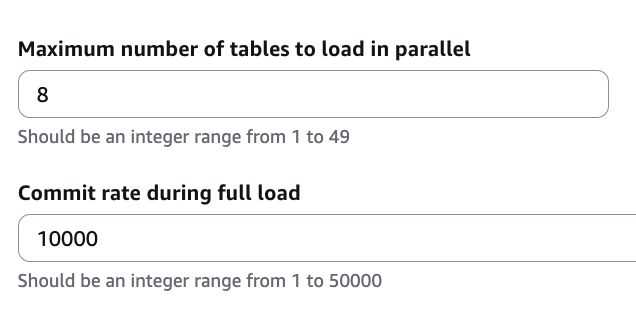
- Optimize commit rate and enabling batching to control the frequency of commits and batch size to achieve a balance between performance and stability.

- Use table partitioning by breaking larger table into smaller partitions or chunks for more manageable and faster migration.
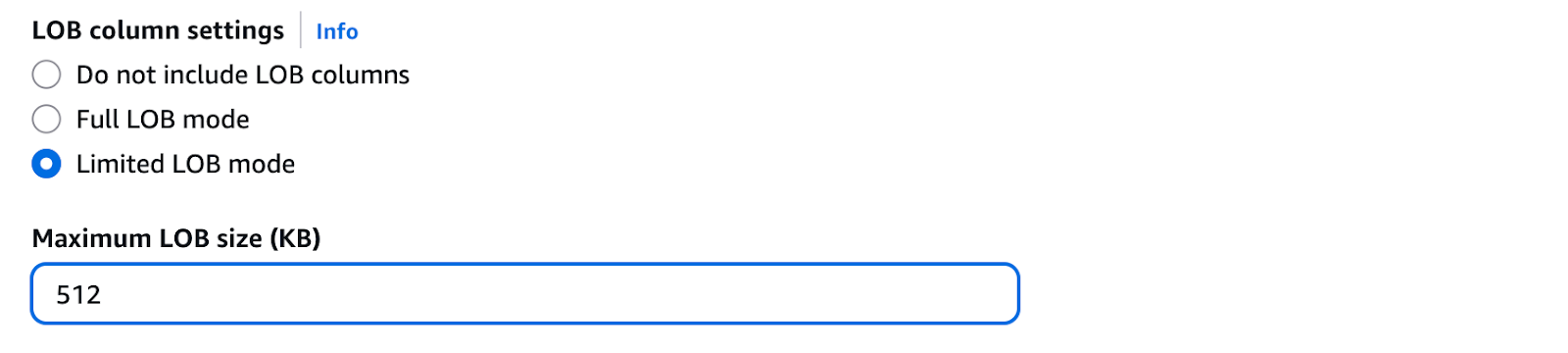
- Use Limited LOB mode instead of Full LOB mode for faster migration when handling large objects (LOBs).
- Ensure the DMS replication instance, source, and target databases are located in the same Availability Zone (AZ) to minimize network latency.
Beyond these architectural best practices, fine-tuning MySQL/InnoDB variables can significantly enhance write performance during migration. The following variables are categorized based on whether they require a database restart.
Runtime Optimization Variables:
These variables can be enabled or adjusted without restarting the database server and help improve write performance during migration:
innodb_flush_log_at_trx_commit = 0
innodb_change_buffer_max_size = 40–50%
innodb_change_buffering = inserts
innodb_flush_neighbors = 0
sync_binlog = 0
innodb_io_capacity = 2000
innodb_io_capacity_max = 4000
innodb_lru_scan_depth = 1024
These settings reduce disk I/O overhead and optimize transaction flushing behavior, allowing smoother bulk data loading during migration.
While the above variables can be adjusted on-the-fly, the following parameters offer even greater performance gains but require planning for a database restart:
Variables Requiring Server Reboot:
The following parameters can significantly boost performance but require a database restart to take effect:
log_bin = OFF
innodb_doublewrite = OFF
innodb_adaptive_hash_index = OFF
innodb_log_file_size = Larger value
Disable Redo Log (Temporary during Load Phase)
Reduces overhead during bulk data migration but should be re-enabled after migration to maintain crash recovery safety.
Post-migration reversion steps
Revert all modified variables to their safer default values, including redo logs, binlogs, and InnoDB settings, after migration to ensure data stability and durability.
LOB Sizing Configuration Guide
Beyond general performance optimization, handling large objects requires special attention. One common challenge during DMS migrations involves handling Large Objects (LOBs) such as TEXT, BLOB, and binary data. Incorrect LOB sizing can cause migration failures, data truncation, or severe performance degradation. Here's a step-by-step approach to configure LOB sizing correctly:
Step 1: Identify Tables with LOB Columns
Start by identifying which tables contain LOB columns. Use the below query to list all tables, their column names, and data types that include large objects.
SELECT TABLE_SCHEMA, TABLE_NAME, COLUMN_NAME, DATA_TYPE
FROM INFORMATION_SCHEMA.COLUMNS
WHERE DATA_TYPE IN ('blob', 'text', 'mediumblob', 'mediumtext', 'longblob', 'longtext');
This step helps determine which tables need special handling during migration.
Step 2: Retrieve Maximum LOB Size per Column
Once you have identified the LOB columns, use the following query to find the maximum LOB size for each column.
SELECT MAX(LENGTH(column)) AS max_column FROM Database.Table;This query helps measure the largest possible LOB value stored in each column, which is critical for sizing.
Step 3: Calculate Total LOB Size
- After retrieving the maximum size for each column:
- Sum all maximum values across all tables.
- Convert the total from bytes to kilobytes (KB).
- Add a 10% buffer to account for variations and ensure safe migration.
Formula:
Total LOB Size (KB) = (Sum of all Max Sizes in Bytes / 1024) + 10% buffer
Step 4: Configure Limited LOB Mode in DMS
- Use the calculated total LOB size when configuring your AWS DMS task in Limited LOB Mode.
- This mode allows DMS to migrate LOBs efficiently by reading only up to the specified size limit per LOB.
- If your total calculated size is 512 KB, set: Limited LOB Size = 512 KB
Step 5: Validate and Monitor
- Run a test migration for LOB-heavy tables.
- Monitor the migration task using CloudWatch metrics like CDCLatencySource, FullLoadThroughputRowsTarget, and NetworkReceiveThroughput.
- Adjust the LOB size if you notice truncation or performance degradation.
Successfully executing an AWS DMS migration requires careful planning, proper configuration, and ongoing monitoring. As you prepare for your migration, keep these essential points in mind:
Key Takeaways:
- Identify LOB columns early to plan migration efficiently.
- Measure maximum LOB sizes and add a safety buffer to avoid truncation.
- Use Limited LOB Mode in DMS for faster and safer LOB migration.
- Optimize performance variables (commit rate, parallel load, partitioning) for large datasets.
- Always monitor CW metrics and DMS migrations to ensure smooth replication.
- Revert all temporary performance tuning settings post-full loads completes to ensure data integrity and stability.
AWS DMS provides a powerful, flexible solution for database migrations with minimal downtime. By understanding the core architecture, selecting the appropriate migration mode, optimizing performance variables, and properly configuring LOB handling, you can ensure a successful migration regardless of your database size or complexity.
Remember: a well-planned migration today prevents costly downtime and data issues tomorrow. Start with thorough assessment, implement these optimization strategies, and maintain continuous monitoring throughout your migration journey.
Executing a flawless AWS database migration requires deep expertise in DMS configuration, performance optimization, and zero-downtime strategies. As an AWS Advanced Tier Partner Partner, Mydbops specializes in seamless cloud migrations with zero data loss. Our AWS migration experts handle Pre-migration assessment & DMS configuration, Performance tuning & 24/7 monitoring, Zero-downtime cutover & post-migration validation. Don't risk your critical data—let our our AWS Advanced Tier Partner specialists manage your migration end-to-end.

.avif)

.avif)

.avif)

.avif)


.svg)
