

.avif)
Managed Buffer Pool in Cloud SQL for MySQL: Preventing OOM Before It Becomes an Outage
One of the most common causes of unexpected MySQL outages is not replication failure, storage issues, or slow queries, it's memory exhaustion.
A database server can appear completely healthy until a sudden workload spike consumes the remaining available memory. Once memory becomes critically low, Linux invokes the Out-of-Memory (OOM) Killer, which often selects mysqld as a victim process. The result is an unexpected database crash, crash recovery, application failures, and operational disruption.
To address this problem, Google Cloud introduced Managed Buffer Pool for Cloud SQL for MySQL on June 8, 2026.
Rather than waiting for the operating system to terminate MySQL, Cloud SQL now proactively reacts to memory pressure by temporarily reducing the InnoDB Buffer Pool size, releasing memory back to the system, and preventing an OOM event from occurring.
This feature is not designed to improve performance. Its primary objective is simple:
Keep the database online during memory pressure situations.
The Traditional OOM Scenario
Consider a Cloud SQL instance with the following configuration:
Instance Memory           : 64 GB
innodb_buffer_pool_size   : 48 GB
Under normal conditions:
Buffer Pool               : 48 GB
Other MySQL Memory        : 8 GB
Operating System          : 6 GB
Free Memory               : 2 GB
The database operates normally and maintains healthy performance.
Now imagine a sudden workload increase:
- Traffic spikes due to a marketing campaign such as email outreach
- Connection count increases significantly
- Large reporting queries begin executing
- Temporary table usage grows
- Sort operations consume additional memory
The memory footprint gradually increases beyond what was originally planned.
At this point, the problem is no longer performance. The problem is availability.
Why OOM Events Are Difficult to Predict
Many database engineers size the Buffer Pool correctly and still encounter OOM events. This happens because MySQL memory consumption extends beyond the Buffer Pool.
Additional memory can be consumed by:
- Active client connections
- Sort buffers
- Join buffers
- Temporary tables
- Internal caches
- Replication threads
- Background operations
A server that appears properly sized under normal traffic can suddenly encounter memory pressure during unexpected workload changes. This is precisely the scenario Managed Buffer Pool is designed to address.
Why Cloud SQL Chooses the Buffer Pool
When memory pressure occurs, Cloud SQL needs a mechanism to release memory quickly.
Most MySQL memory consumers are either:
- Temporary
- Connection-specific
- Difficult to reclaim safely
The InnoDB Buffer Pool is different. In most production environments, it represents the largest configurable memory component.
For example:
Total Memory              : 64 GB
Buffer Pool               : 48 GB
Other Memory Consumers    : 10 GB
Operating System          : 6 GB
If Cloud SQL needs to immediately free several gigabytes of memory, the Buffer Pool provides the most effective and safest option. This is why Managed Buffer Pool focuses on dynamically adjusting innodb_buffer_pool_size.
How Managed Buffer Pool Works
Managed Buffer Pool continuously monitors overall instance memory utilization. When memory usage approaches critical thresholds, Cloud SQL automatically intervenes.
Instead of waiting for Linux to terminate MySQL, Cloud SQL proactively reclaims memory from the Buffer Pool.
For example:
Before Intervention
Buffer Pool : 48 GB
Free Memory : Critically Low
Cloud SQL may temporarily reduce:
Buffer Pool : 40 GBThis immediately returns approximately 8 GB of memory to the operating system.
After Intervention
Buffer Pool : 40 GB
Free Memory : Increased
The database continues serving requests without requiring a restart.
Will Performance Always Be Affected?
Not necessarily. The impact depends entirely on the workload.
Consider the following scenario:
Buffer Pool Size      : 48 GB
Working Dataset       : 15 GB
If Cloud SQL reduces the Buffer Pool to 40 GB, the active dataset still comfortably fits in memory. The application may observe little to no performance impact.
Now consider another scenario:
Buffer Pool Size      : 48 GB
Working Dataset       : 46 GB
After reduction:
Buffer Pool Size      : 40 GB
Working Dataset       : 46 GB
Some pages must now be evicted from memory. Possible effects include:
- Increased disk reads
- Lower cache efficiency
- Higher storage I/O
- Increased query latency
The actual impact depends on how closely the workload depends on the full Buffer Pool allocation.
What Happens After Memory Pressure Ends?
One of the most useful aspects of Managed Buffer Pool is that the reduction is temporary.
As workload intensity decreases and memory conditions stabilize, Cloud SQL gradually restores the original Buffer Pool size.
The recovery process follows:
This allows the system to regain its original caching capacity after the risk has passed.
Enabling Managed Buffer Pool
Managed Buffer Pool is disabled by default and must be explicitly enabled for Cloud SQL MySQL instances.
The feature is supported only for:
- Cloud SQL for MySQL 8.0+
- Dedicated-core instances
- Enterprise and Enterprise Plus editions
The feature is not supported for:
- Shared-core instances
- MySQL 5.6
- MySQL 5.7
Cloud SQL exposes Managed Buffer Pool through the following database flags:
SHOW VARIABLES LIKE '%innodb_cloudsql_managed_buffer_pool%';+---------------------------------------------------+-------+
| Variable_name | Value |
+---------------------------------------------------+-------+
| innodb_cloudsql_managed_buffer_pool | OFF |
| innodb_cloudsql_managed_buffer_pool_dry_run | OFF |
| innodb_cloudsql_managed_buffer_pool_threshold_pct | 95 |
+---------------------------------------------------+-------+To enable the feature, set:
innodb_cloudsql_managed_buffer_pool=ONAn important advantage is that enabling or disabling the feature does not require a Cloud SQL instance restart, allowing it to be introduced without downtime.
Understanding the Memory Threshold
Managed Buffer Pool does not wait until memory is completely exhausted before taking action.
Instead, Cloud SQL continuously monitors overall memory utilization and begins reducing the Buffer Pool when a configurable memory threshold is reached. The default threshold depends on instance memory size.
For example, a 64 GB instance falls into the 15–100 GB range:
Instance Memory : 64 GB
Default Threshold : 95%
Cloud SQL begins intervention when memory utilization reaches approximately:
64 × 95%= 60.8 GBAt this point, Cloud SQL starts reclaiming memory by reducing innodb_buffer_pool_size before Linux reaches an OOM condition.
- Administrators can customize the threshold using innodb_cloudsql_managed_buffer_pool_threshold_pct
- The value can be configured between 50% - 99%
For example:
gcloud sql instances patch INSTANCE_NAME \
--database-flags=innodb_cloudsql_managed_buffer_pool=on,\
innodb_cloudsql_managed_buffer_pool_threshold_pct=97
Like the feature itself, changing the threshold does not require a restart.
Monitoring Buffer Pool Adjustments
One important behavior to understand is that Cloud SQL dynamically changes the runtime value of innodb_buffer_pool_size.
However, these runtime changes are not reflected in the Google Cloud Console flag configuration.
For example, the console may continue to display:
innodb_buffer_pool_size = 48 GBwhile Cloud SQL has temporarily reduced the active value to 40 GB during a memory pressure event.
To view the actual runtime value, connect to MySQL and execute:
SHOW GLOBAL VARIABLES LIKE 'innodb_buffer_pool_size';This allows DBAs to verify whether Managed Buffer Pool has adjusted the Buffer Pool size.
A practical monitoring workflow is:
By tracking both memory utilization and innodb_buffer_pool_size, administrators can easily identify when Cloud SQL has intervened.
Important Limitations
Although Managed Buffer Pool significantly improves protection against memory-related outages, it should not be viewed as a guaranteed solution for every OOM scenario.
Google specifically notes several situations where OOM events may still occur:
Extremely Rapid Memory Growth
If memory consumption increases faster than Cloud SQL can reduce the Buffer Pool, the instance may still encounter an OOM condition.
Under-Provisioned Instances
If the workload consistently requires more memory than the instance provides, reducing the Buffer Pool may not free sufficient memory to prevent exhaustion.
Misconfigured Memory Settings
Managed Buffer Pool only adjusts innodb_buffer_pool_size. It cannot correct excessive memory allocations caused by other poorly configured MySQL parameters.
Cold Buffer Pool Conditions
If the Buffer Pool is not fully warmed up, reducing it may provide limited benefit while still affecting cache efficiency.
Because of these limitations, Managed Buffer Pool should be viewed as a safety mechanism rather than a replacement for proper capacity planning and performance tuning.
Its purpose is to reduce the likelihood of an outage, not eliminate the need for good database engineering practices.
What Managed Buffer Pool Does Not Replace
Although this feature improves resilience, it should not be viewed as a replacement for proper database sizing and performance tuning.
It cannot solve:
- Under-provisioned infrastructure
- Poor query design
- Excessive connection counts
- Inefficient application behavior
- Chronic memory shortages
If Managed Buffer Pool activates frequently, it should be treated as an indicator that further investigation is required.
The feature is intended to absorb temporary memory pressure events, not compensate for long-term capacity problems.
Why This Feature Matters
- Historically, MySQL memory management has been largely static.
- DBAs allocate memory based on expected workloads and leave sufficient headroom to accommodate unexpected traffic patterns.
- Managed Buffer Pool introduces a more adaptive approach.
- Rather than allowing memory pressure to escalate into a database crash, Cloud SQL can now automatically reclaim memory from the largest configurable memory component and keep the database online.
For production environments, this shifts the outcome from:
That is a significant improvement in operational resilience.
Validating Managed Buffer Pool in Cloud SQL for MySQL
While the Managed Buffer Pool feature is well documented, understanding how it behaves during an actual memory pressure event provides significantly more operational value than theoretical examples alone.
To validate the feature, a controlled memory-intensive workload was executed against a Cloud SQL for MySQL instance with Managed Buffer Pool enabled. The objective was to intentionally drive the instance toward memory exhaustion and observe how Cloud SQL responds before an Out-of-Memory (OOM) condition occurs.
The validation focused on answering four key questions:
- Does Cloud SQL automatically detect memory pressure?
- Does Managed Buffer Pool dynamically resize the InnoDB Buffer Pool?
- Can memory be reclaimed without restarting MySQL?
- Does the instance remain available throughout the intervention?
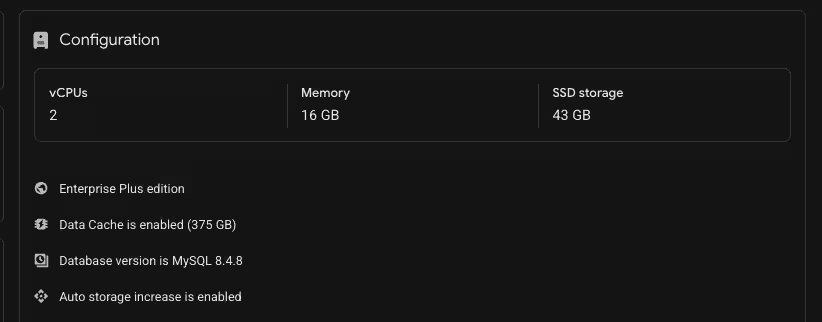
Test Environment
The validation was performed using the following Cloud SQL configuration:
Test Methodology
A memory intensive workload was executed to gradually increase overall instance memory consumption.
The workload was designed to:
- Generate large memory allocations
- Increase temporary memory consumption
- Create sustained memory pressure
- Push the instance beyond the configured Managed Buffer Pool threshold
The expectation was that Cloud SQL would proactively reclaim memory from the InnoDB Buffer Pool before the operating system reached a state where an OOM event could occur.
Memory Growth and Threshold Breach
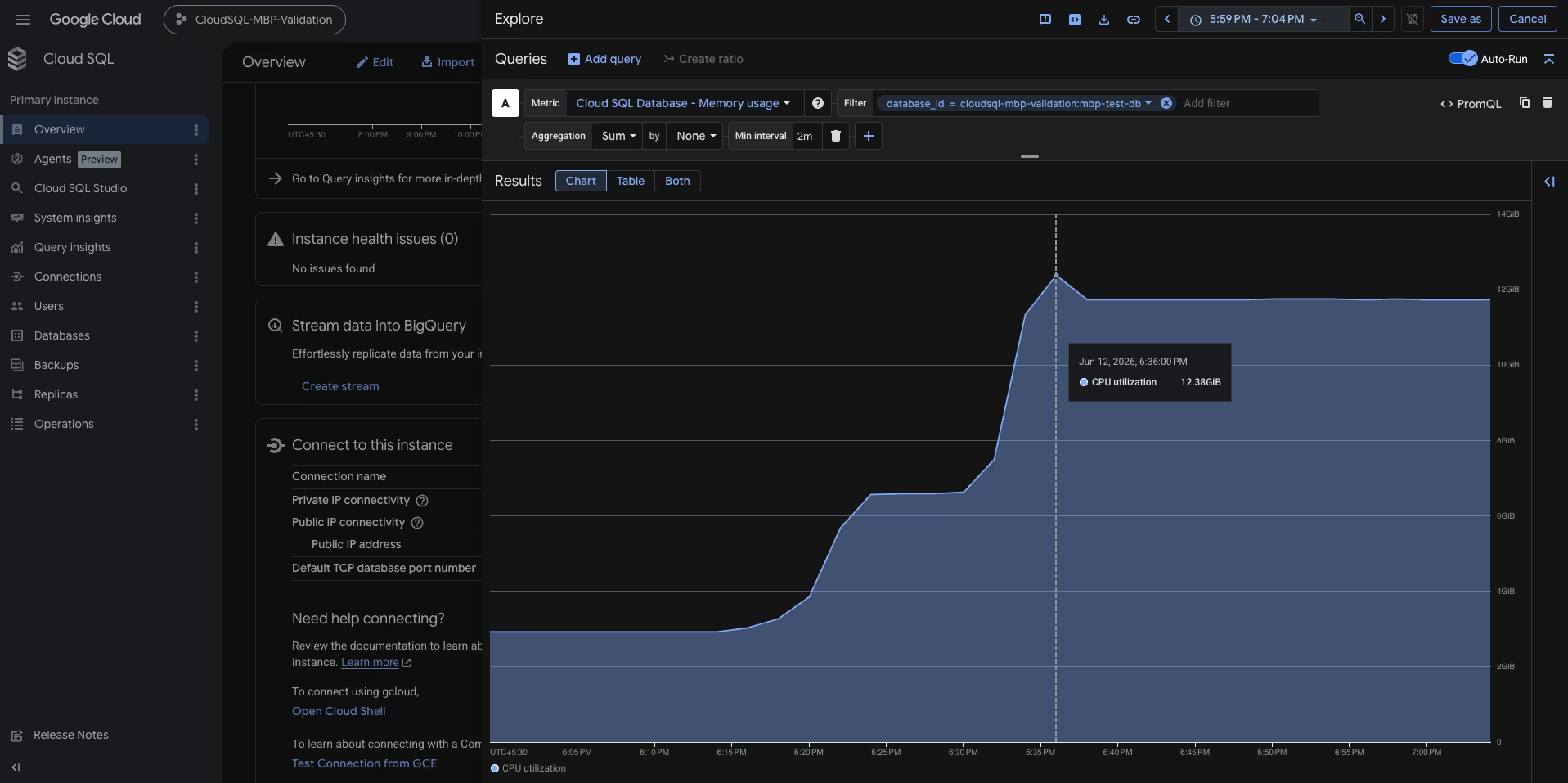
- As the workload progressed, overall memory consumption increased steadily before accelerating rapidly.
- The instance memory footprint grew from approximately 3 GiB to more than 12 GiB during the test execution window.
- At approximately 6:35 PM IST, memory utilization exceeded the configured Managed Buffer Pool threshold of 80%, reaching 81.2% utilization, while available free memory dropped to approximately 8.35%.
At this point, Cloud SQL detected memory pressure and initiated automatic memory protection activities.
Managed Buffer Pool Activation
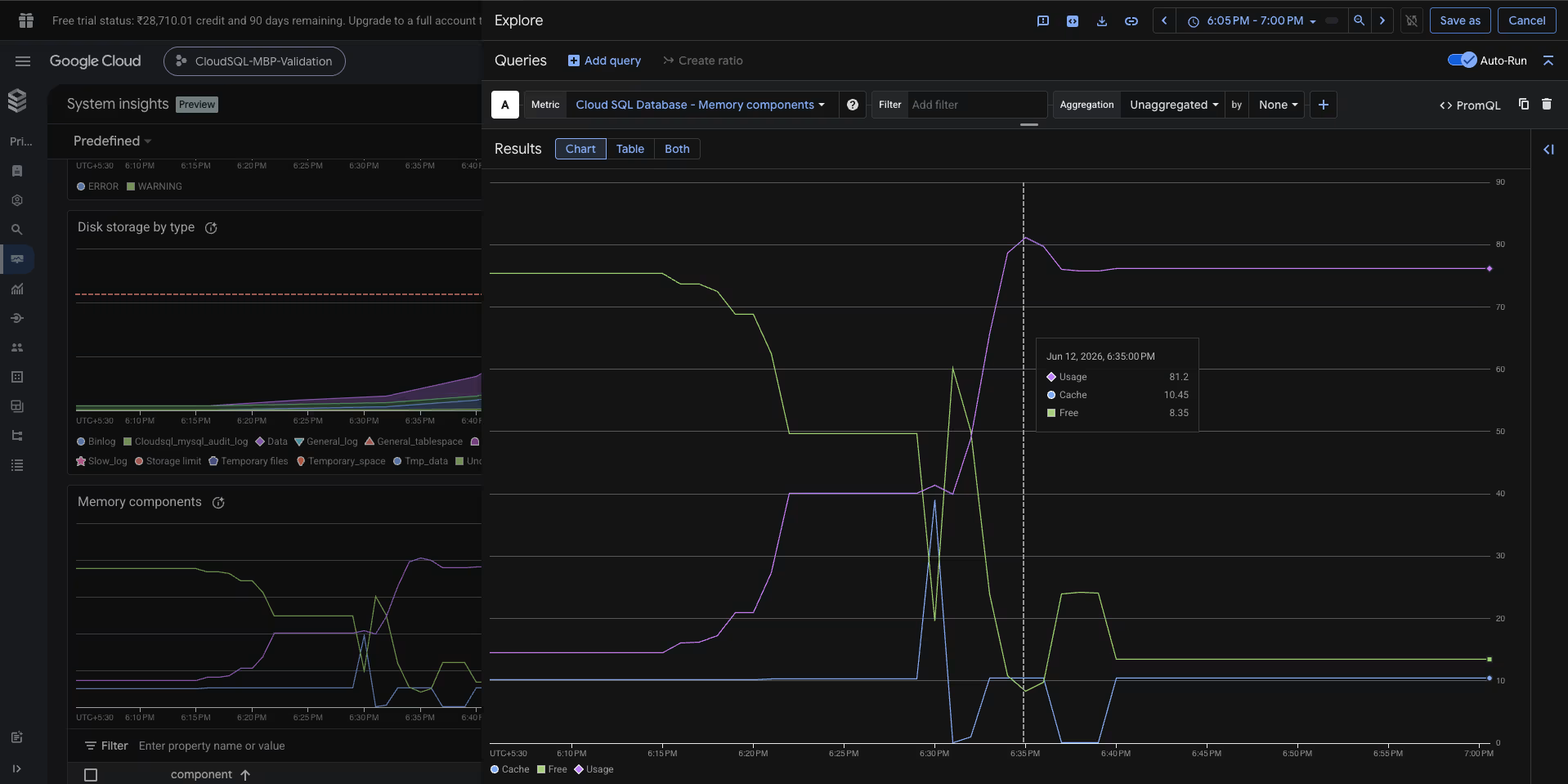
Cloud SQL System Insights provides a detailed view of memory utilization during the intervention window.
At approximately 6:35 PM IST, the following values were observed:
This exceeded the configured threshold and triggered Managed Buffer Pool intervention.
Managed Buffer Pool Intervention
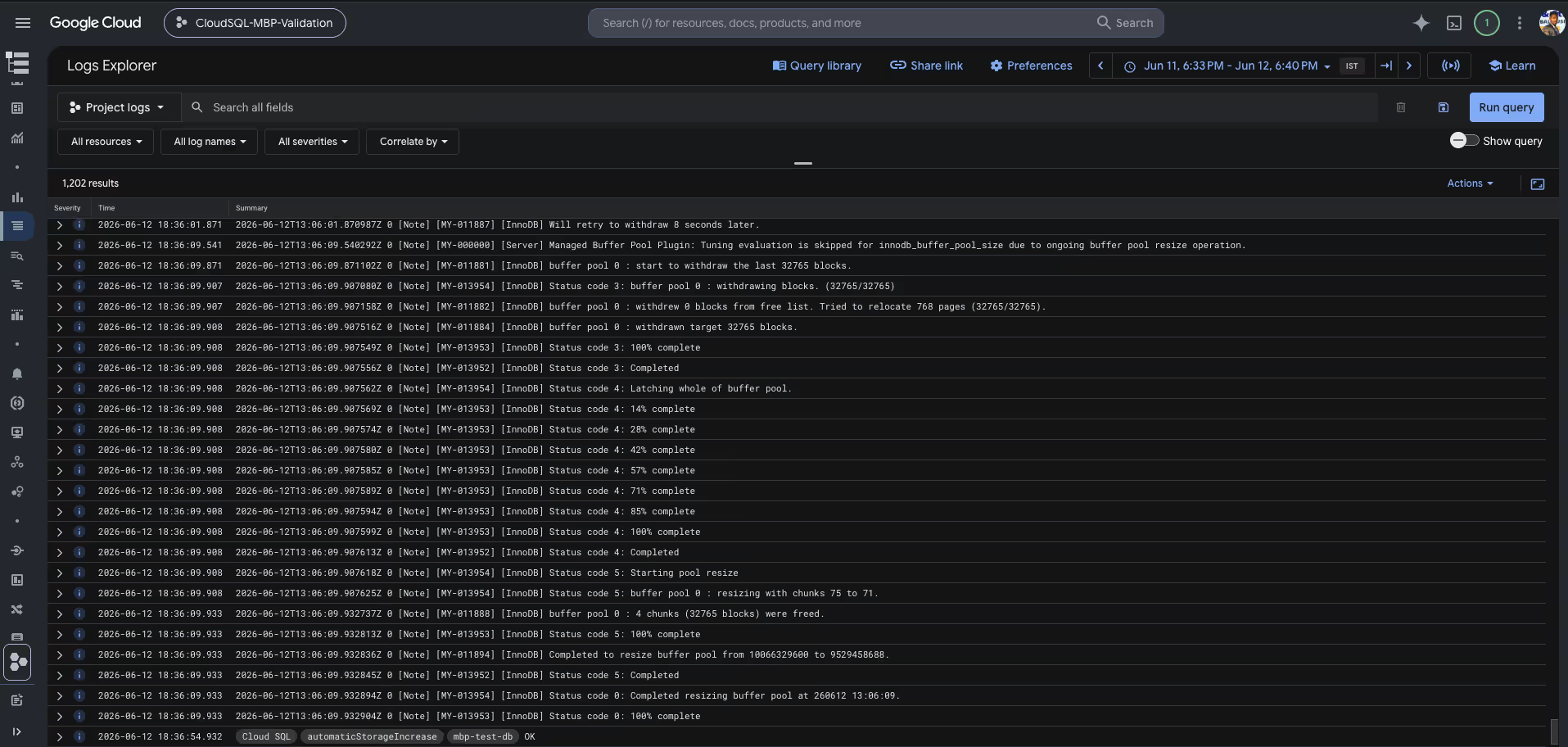
Once the threshold was breached, Cloud SQL automatically initiated an online InnoDB Buffer Pool resize operation to reclaim memory from the cache layer.
The MySQL error log recorded the following sequence:
2026-06-12T13:06:09

Managed Buffer Pool detected memory pressure and initiated a buffer pool resize.

[InnoDB] Start withdrawing buffer pool pages.
[InnoDB] Status Code 3: Withdrawing pages completed.
[InnoDB] Status Code 4: Buffer pool structures latched.
[InnoDB] Status Code 5: Starting pool resize.

[InnoDB] Completed to resize buffer pool
from 10066329600
to   9529458688

[InnoDB] Buffer pool resize completed successfully.
Resize Analysis
The intervention reduced the active InnoDB Buffer Pool from 10,066,329,600 bytes to 9,529,458,688 bytes resulting in 536,870,912 bytes ≈ 512 MB being returned to the operating system.
Throughout the operation:
- No restart occurred
- No database crash occurred
- No crash recovery was required
- Existing connections remained active
- Workload execution continued uninterrupted
This confirms that Managed Buffer Pool can reclaim memory online without impacting database availability.
Internal Buffer Pool Resize Workflow
The captured logs provide visibility into the internal InnoDB resize process.
This sequence demonstrates how InnoDB safely reduces memory consumption while the database remains online.
Memory Reclaimed
Memory Component Analysis
Immediately following the intervention:
- Cache memory decreased
- Free memory increased
- Memory growth stabilized
- The database remained available
The Memory Components dashboard clearly shows memory being redistributed after the resize operation.
Buffer Pool Expansion Recovery
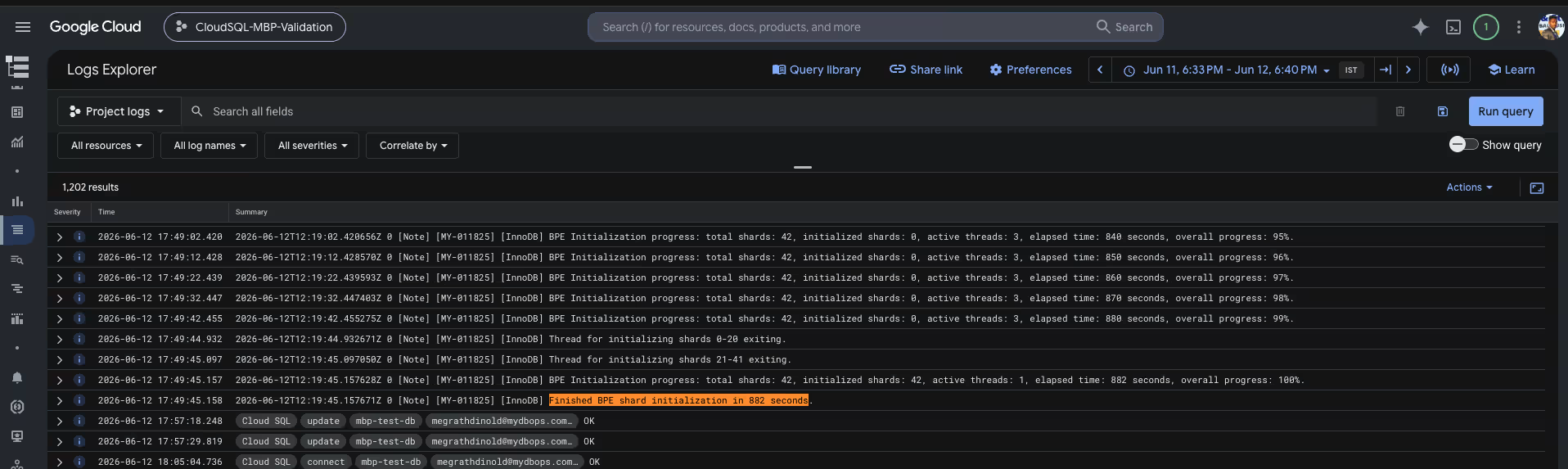
After memory pressure subsided, Cloud SQL initiated Buffer Pool Expansion (BPE) activities.
The logs recorded: BPE Initialization progress:
- total shards: 42
- initialized shards: 42
- overall progress: 100%
- Finished BPE shard initialization in 882 seconds.
Validation Results
The validation successfully demonstrated the complete Managed Buffer Pool lifecycle under memory pressure.
Key Findings
✓ Cloud SQL automatically detected memory pressure.
✓ Managed Buffer Pool dynamically reduced the InnoDB Buffer Pool.
✓ Approximately 512 MB of memory was reclaimed during the intervention event.
✓ No database restart occurred.
✓ No OOM condition occurred.
✓ Database availability was maintained throughout the event.
✓ Cloud SQL automatically initiated Buffer Pool recovery activities after memory conditions stabilized.
This validation confirms that Managed Buffer Pool functions as an effective availability protection mechanism. By proactively reclaiming memory before the operating system reaches a critical state, Cloud SQL can mitigate memory-related outages while maintaining database service continuity.
Conclusion
Managed Buffer Pool is one of the most practical enhancements introduced to Cloud SQL for MySQL in recently.
The feature does not eliminate the need for proper sizing, capacity planning, or performance tuning. However, it provides an intelligent safety mechanism that helps protect MySQL instances during unexpected memory pressure situations.
By dynamically reducing the InnoDB Buffer Pool before Linux reaches an OOM condition, Cloud SQL prioritizes availability over temporary cache efficiency.
In many production environments, a temporary reduction in cache capacity is far preferable to an unexpected database crash, crash recovery, and application downtime.
For database engineers responsible for maintaining highly available MySQL platforms, Managed Buffer Pool represents a valuable additional layer of protection against one of the most disruptive failure scenarios in database operations.
Need Help Optimizing Your Cloud SQL Environment?
If you are struggling with persistent database out-of-memory issues or want to optimize your MySQL infrastructure on Google Cloud Platform, our database experts are here to help. At Mydbops, we specialize in comprehensive MySQL Consulting Services, offering expert tuning, proactive architecture design, and 24/7 managed support.



.avif)

.avif)
.avif)
.avif)

.avif)


.svg)
